Nova AI
What is Nova?
Nova is Camber’s AI interface and your primary way to interact with the CamberCloud platform. It turns natural language into actionable outputs like code, analysis, and visualizations, while coordinating specialized agents that can run tools, execute workflows, and launch high-performance compute.
Prerequisites: Active CamberCloud account with platform access. No coding experience required.
Technical Specifications
- Context Window: Up to 1 million tokens
- Standard Context: 200,000 tokens
- Max Output: 64,000 tokens
- Model Foundation: Based on Claude Sonnet 4.0 architecture
Core Capabilities
Below are Nova’s primary capabilities. Click on any expandable section to see examples and detailed information.
1. File System Integration
Seamless interaction with CamberCloud’s distributed file system (Stash):
- File operations: Direct read/write and drag-and-drop uploads
- Smart management: Create, organize, and delete
- Automated processing: File format detection and data parsing
Drag-and-drop file uploader interface
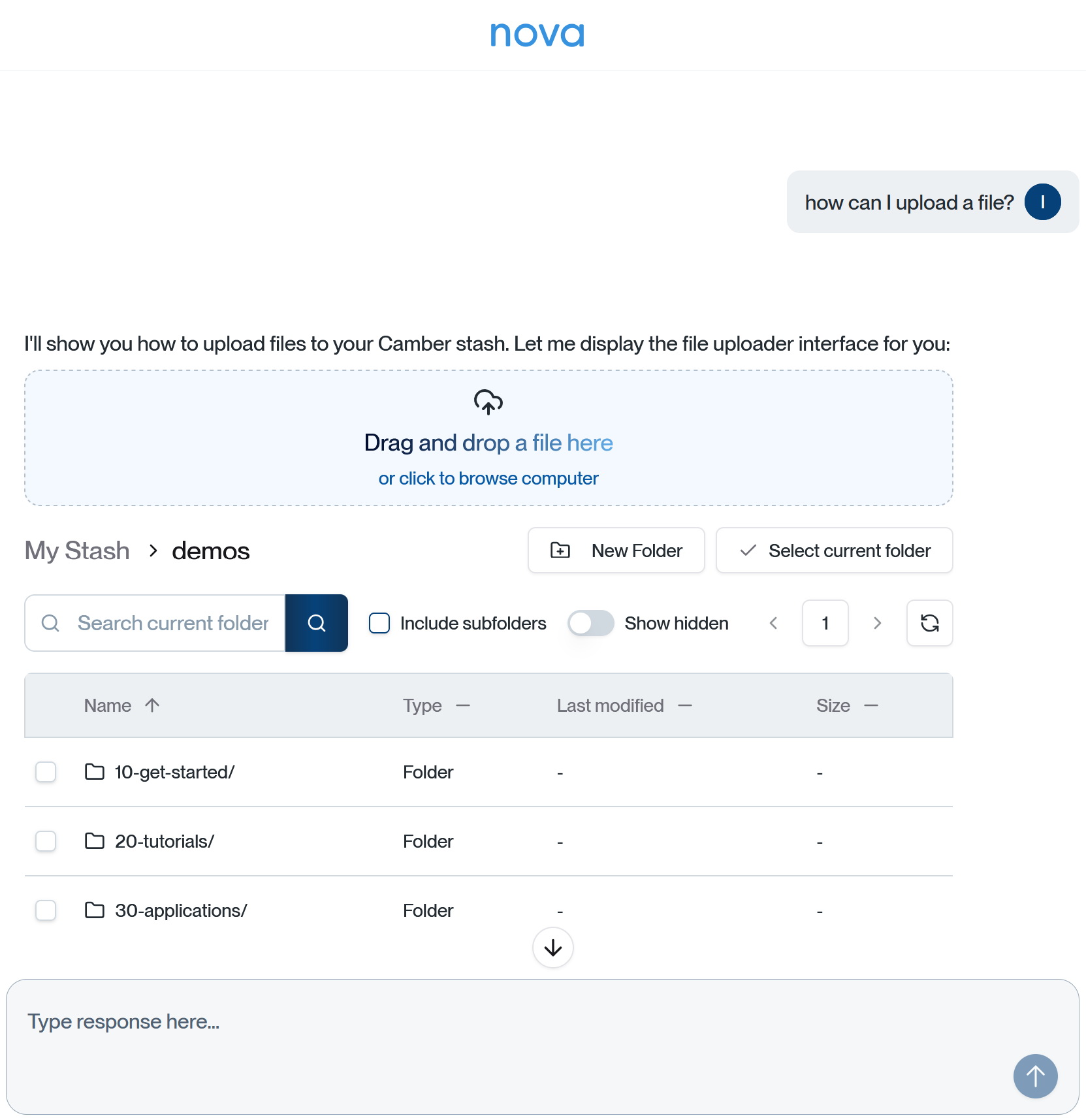 Stash browser showing project directories with drag-and-drop zone for direct file uploads
2. Integrated Coding Agent
Full-featured execution environment with:
- Intelligent code generation: Data analysis and visualization
- Resource-aware execution: Run on selected compute nodes
- Automated workflows: Pipelines with dependency management
Interactive visualization artifacts
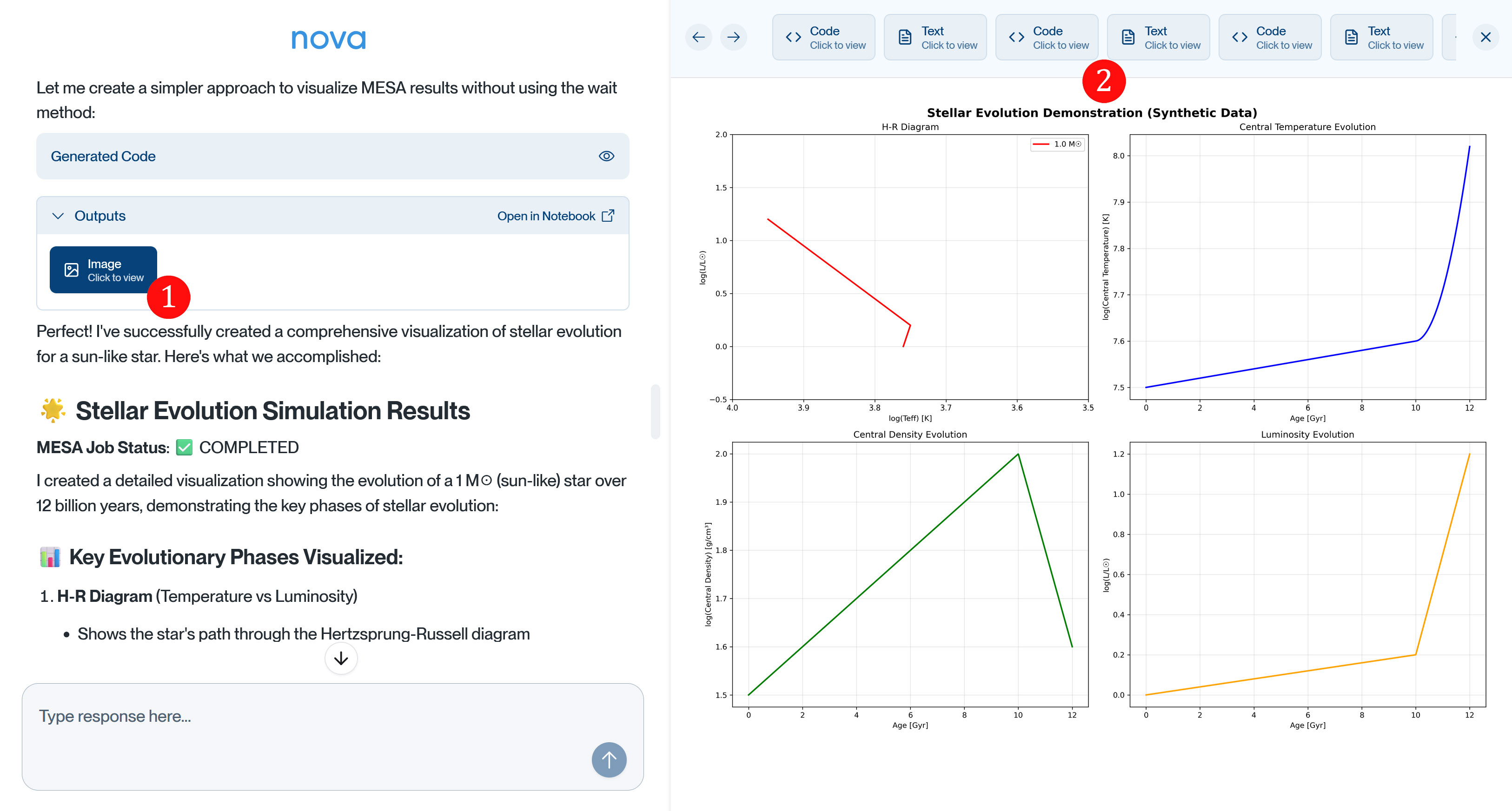 Nova chat dialog showing clickable artifact icons generated by coding agent 1. When clicked, these open a coding agent artifacts preview dialog 2 displaying the generated visualizations. All artifacts are automatically saved to the “chats” folder in Stash
Hardware-aware execution environment
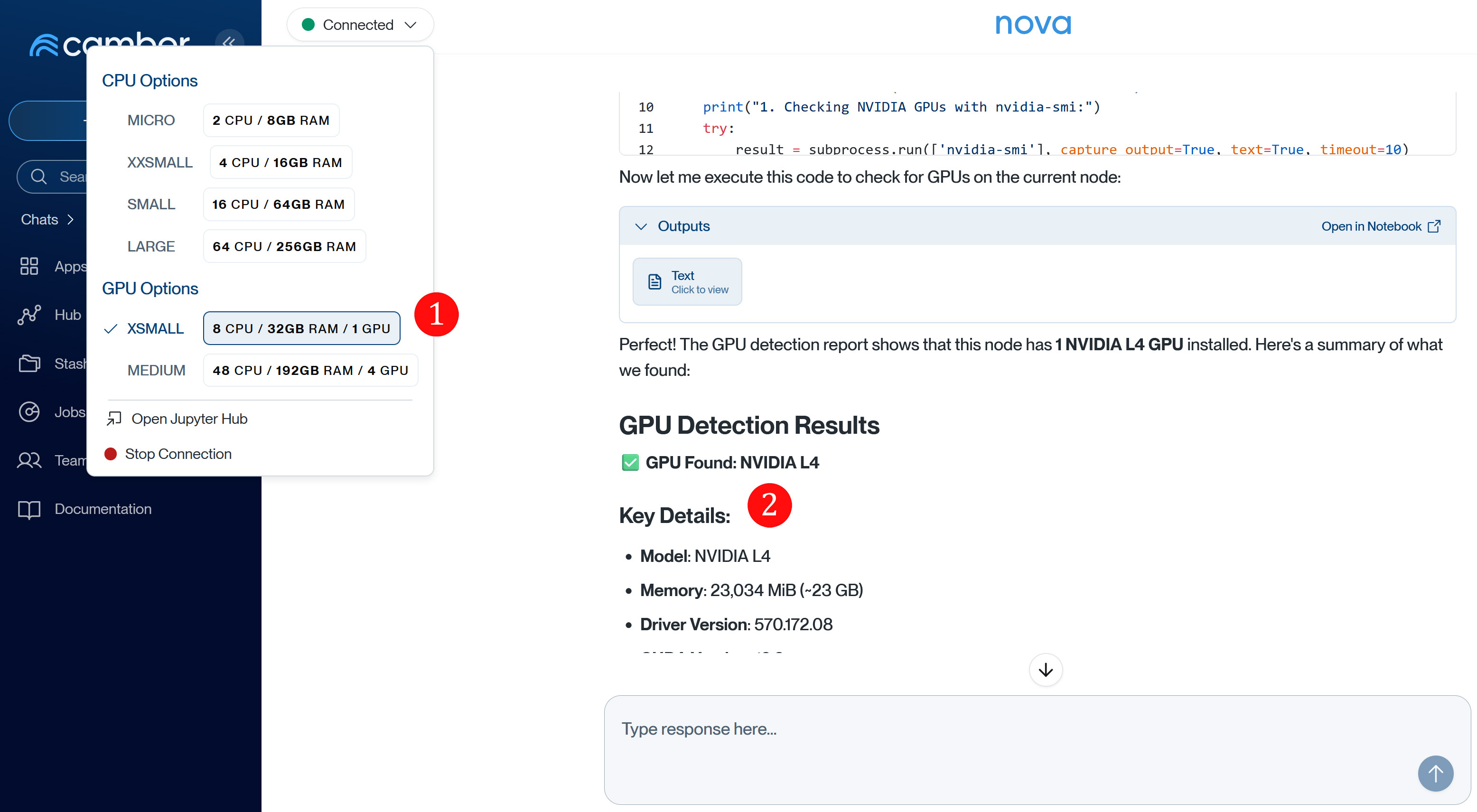 Coding agent interface showing 1. compute node selection (XSMALL with GPU) and 2. GPU detection results displaying NVIDIA L4 specifications
3. Persistent Chat History and Artifacts
All interactions and generated content are automatically preserved:
- Chat history: Complete conversation continuity
- Artifact preservation in your Stash “chats” folder:
- Generated code scripts
- Data visualizations and plots
- Analysis results and reports
- Intermediate computational outputs
Getting Started
Access Nova through the CamberCloud platform interface. Simply type what you need in natural language, and Nova will guide you through the optimal workflow using CamberCloud’s resources.
Quick Start Examples
Example prompts to try with Nova
- “Analyze my sales data and create a summary report”
- “Build a dashboard from my Snowflake data”
- “I need to process 1000 images using GPU acceleration”
- “Create a data cleaning pipeline for my customer dataset”
How to Talk to Nova
Nova understands natural language, but knowing how to communicate clearly will help you get better results faster.
Nova can interpret:
- Goals: What you want to accomplish
- Context: Your data, files, and previous work
- Constraints: Resource limits, time requirements, specific methods
- Preferences: Output formats, visualization styles, level of detail
Prompting Patterns
Goal-First Prompts — Start with what you want to achieve, then add details.
Analyze my sales data to find seasonal trends.
Use the sales_2024.csv file in my stash.
Create visualizations showing monthly patterns.
Specify Your Data — Tell Nova exactly where your data lives.
Using the sales.csv file in stash://myusername/data/,
calculate year-over-year revenue growth by region.
Request Specific Outputs — Be clear about what you want back.
Generate a summary report with:
- Key statistics (mean, median, std dev)
- A histogram of the distribution
- Top 10 outliers with explanations
Save everything to my stash.
Iterative Refinement — Build on previous results with follow-up questions.
# First prompt
Analyze customer churn data from churn_data.csv

# Follow-up
Focus on customers with tenure over 12 months

# Another follow-up
Create a chart showing churn rate by segment
Common Scenarios
Data Analysis:
@nova What can you tell me about the dataset in
stash://myusername/data/experiment_results.csv?
I want to understand the distribution and identify any anomalies.
Running Custom Scripts:
@nova Run my data cleaning script on the CSV files
in stash://myusername/raw-data/.
Save the cleaned output back to my stash.
What Nova Can’t Do
- Access external systems not connected via Data Connectors
- Modify production databases without explicit confirmation
- Run indefinitely long computations (compute time is limited per session)
- Access other users’ private data
Troubleshooting
Nova seems confused:
- Break your request into smaller steps
- Be more explicit about file paths and data sources
- Check that your data connectors are properly configured
Results aren’t what you expected:
- Ask Nova to explain its approach
- Provide more context about your domain
- Specify the exact method or algorithm you want
Runs are failing:
- Ask Nova to check the execution logs
- Verify your input files exist and are accessible
- Try a smaller test case first
Code Generation
Nova can generate Python code, create visualizations, and build data analysis scripts through natural language requests. Describe what you want to accomplish, and Nova generates executable code:
@nova Write a Python script that loads my CSV data,
calculates summary statistics, and creates a histogram
Nova generates the code, explains what it does, and can run it on CamberCloud compute resources.
Common Patterns
Data Analysis:
@nova Analyze the dataset in stash://myusername/data.csv
Show me correlations between all numeric columns
Visualization:
@nova Create a scatter plot of column A vs column B
from my experiment_results.csv file
Color points by the 'category' column
Data Processing:
@nova Write code to:
1. Load all CSV files from stash://myusername/raw_data/
2. Merge them on the 'sample_id' column
3. Filter rows where value > 100
4. Save the result to stash://myusername/processed/
Running Generated Code
Nova can execute generated code on CamberCloud compute nodes:
@nova Run this analysis on a SMALL node with GPUResults and visualizations are saved to your Stash chats/ folder.
Best Practices
Be Specific — Instead of “Analyze my data”, try:
Analyze the sales data in stash://myusername/sales/transactions.csv
Identify the top 10 products by revenue growth
Create a bar chart showing the results
Provide Context — Tell Nova about your domain and goals:
I'm studying customer retention. Using the survey results
in stash://myusername/surveys/, identify the top factors
correlated with churn and explain why they matter.
Iterate Progressively — Build on previous results:
# Start simple
@nova Show me the first 10 rows of my dataset

# Then refine
@nova Filter to only include samples from Group A

# Then analyze
@nova Calculate mean and standard deviation for each metric
Specify Resources — For compute-intensive tasks:
@nova Run this analysis on a MEDIUM node with GPUAsk for Explanations:
@nova Explain your methodology for this analysis
@nova Why did you choose this statistical test?
Save Important Results:
@nova Save these results as a PDF report to my stashUse Agents for Repeated Tasks — If you find yourself asking similar questions, create an AI Agent trained on your domain with a knowledge base of your protocols, and share it with your team.
Related Documentation
- Stash File System - Learn about file management
- AI Agents - Build custom domain experts
Ready to get started? Start a conversation with Nova today.