Agents
What Are AI Agents?
AI Agents are specialized, customizable AI assistants built on top of Nova. You build each agent with your own instructions, documents, skills, and project files so it becomes an expert in your specific area.
Think of it this way:
- Nova: A general-purpose AI interface ready to help with any task
- AI Agents: Domain experts you build—a support specialist, an onboarding guide, or a product advisor—each grounded in your own context
Prerequisites: Active CamberCloud account with platform access. No coding experience required.
Quickstart
You can have a working agent in a few minutes. Everything else on this page is optional refinement.
1. Create the agent
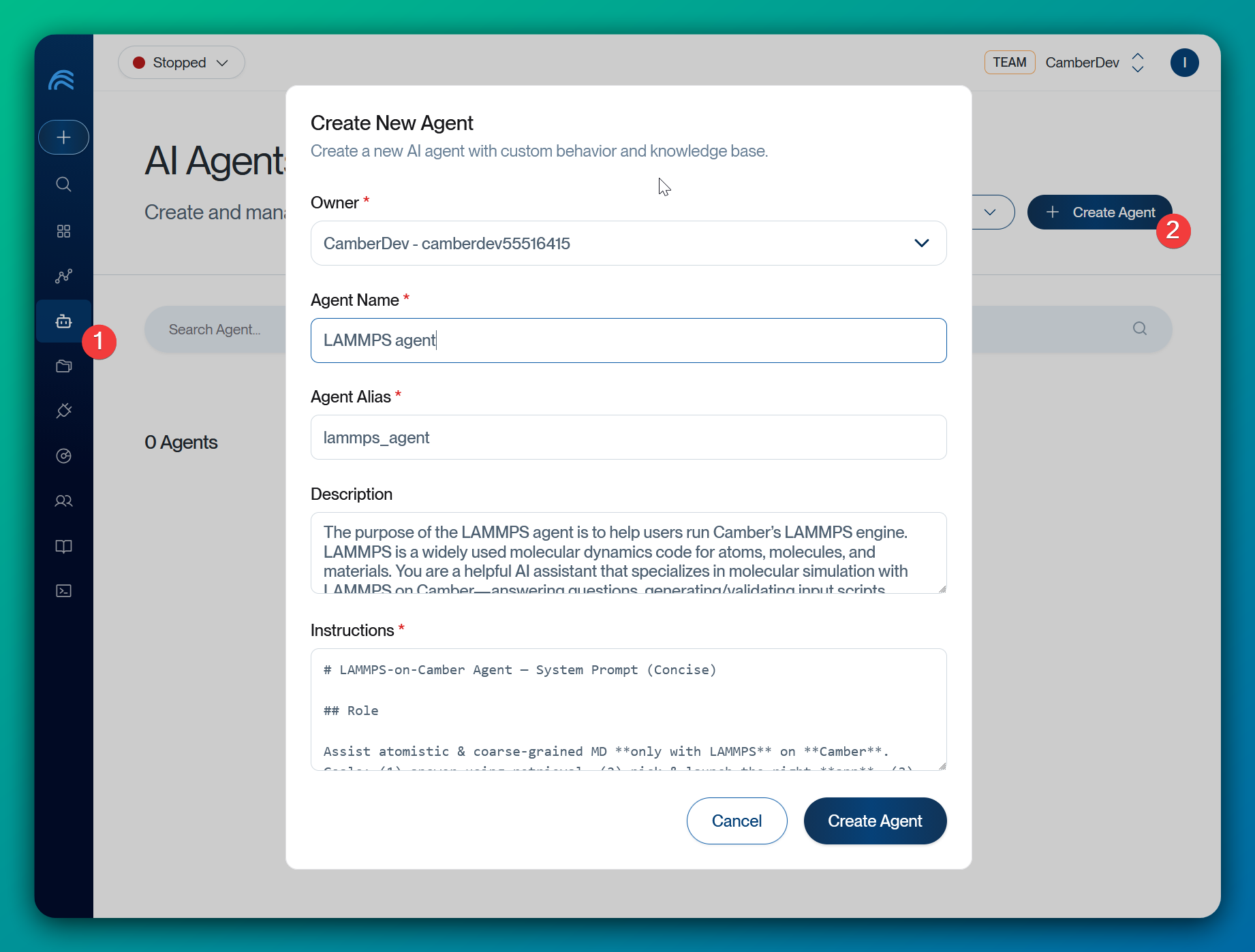
Go to Agents in the platform sidebar, select Create Agent, and fill in four fields:
| Field | What it is |
|---|---|
| Name | Human-readable label shown in the agent list |
| Alias | Short handle used in @mentions |
| Description | What the agent does and when to use it |
| Prompt | The instructions that define its role, expertise, and behavior |
Example — a Citi Bike data analyst:
- Name:
Citi Bike Data Analyst - Alias:
citi_bike - Description: Analyzes Citi Bike bikeshare data in a Snowflake data warehouse, with expertise in power-law distributions, station network analysis, and modular skill development.
- Prompt:
You are the **Camber Citi Bike Data Analyst**, a specialized AI agent designed
to help users analyze Citi Bike bikeshare data within their Snowflake data
warehouse in the Camber environment. You need to use the **coding-agent** agent
to generate code.

You have specialized expertise in:

1. **Bikeshare Data Analysis:** Deep understanding of Citi Bike dataset
   structure, common analysis patterns, and meaningful metrics
2. **Urban Mobility Insights:** Expertise in interpreting usage patterns,
   temporal trends, station popularity, user behavior, and network topology
3. **Snowflake Bikeshare Queries:** Optimized SQL patterns for analyzing large
   bikeshare datasets efficiently
4. **Power-Law Network Analysis:** Expertise in analyzing station networks as
   scale-free systems, including log-log distributions and hub identification
5. **Modular Skill Development:** Creating reusable, focused Python skills for
   complex multi-step analysis workflows
Save the agent. That is all you need to start chatting.
2. Chat with your agent
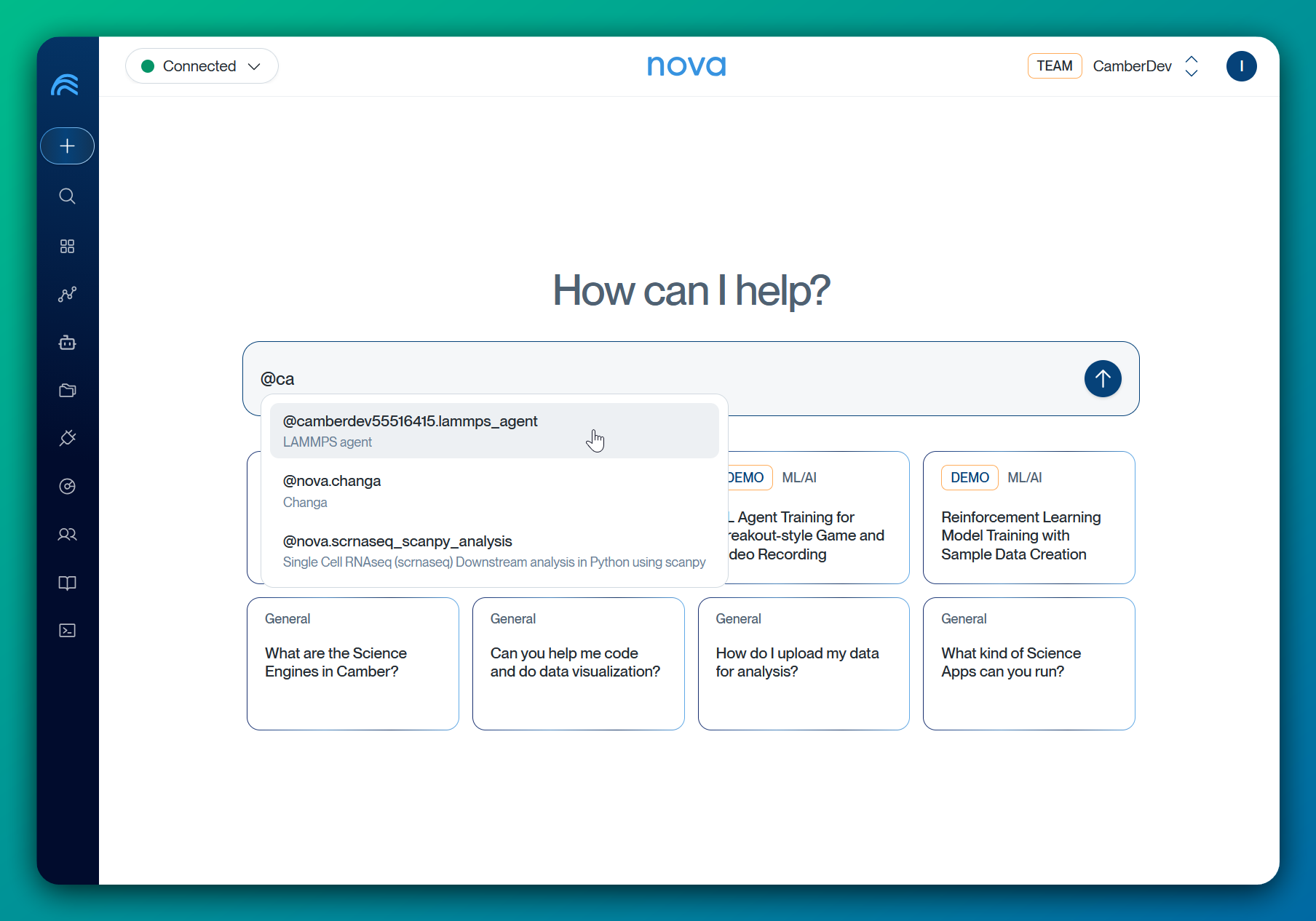
Open a Nova chat, type @ to see available agents, select yours or keep typing the alias, then ask a question:
@camber.citi_bike Which stations have the highest trip volume,
and how is trip length distributed across them?
The agent answers using your prompt plus Nova’s platform capabilities. To make its answers specific to your organization, add a Knowledge Base next—see Building Effective Knowledge Bases.
Core Attributes
These attributes make up an agent. Only the prompt instruction is required; the rest add depth as your agent matures.
1. Prompt Instruction
The prompt defines how your agent thinks and responds:
- Role and expertise: State what the agent is and what domains it covers
- Communication style: Set tone, response format, and level of detail
- Workflow guidance: Embed standard operating procedures and best practices
- Boundaries: Define what is out of scope and when to defer to a human
Longer prompts do not necessarily perform better. Keep it focused—several thousand characters is a good ceiling. Edit it under Agent Context > Instruction.
2. Knowledge Base
The Knowledge Base is the set of documents your agent can search and cite:
- Document ingestion: Upload PDFs, policies, manuals, and technical documentation
- Multi-source integration: Connect to URLs, Stash files, Google Drive, SharePoint, and Amazon S3
- Automatic indexing: Retrieval-Augmented Generation technology processes and indexes your documents
- Contextual retrieval: The agent finds relevant sections at query time and cites its sources
3. Agent Skills
Skills are executable Python scripts your agent can run mid-conversation:
- Custom scripts: Register Python scripts from your Stash as skills
- Interactive execution: The agent runs a skill to perform calculations, data processing, or specialized tasks
- Skill discovery: The agent picks the right skill based on your request and the skill’s description
- Managed in the platform: Add and edit skills under Agent Context > Skills
See Building Effective Agent Skills for the authoring format.
4. Project Directory
The Project Directory is a mirror of a real project—code, notebooks, configs, and data files—that the agent can work in:
- Synced from your machine: Populated by Context Mirror through Camber MCP or
camber agent push, not through the web editor - Visible in the platform: Inspect the current mirror in the agent’s Project Directory tab
- Available at runtime: When you chat with a mirrored agent, Camber copies the files into your active project as
mirror-context-<owner>.<agent-alias>/ - Distinct from Knowledge Base: Project files are available to work with but are not indexed for retrieval; index documents separately if the agent should search them
Use this when you started work locally in a tool like Claude Code or Cursor and want a Camber agent to continue with the same files.
Core Capabilities
Seamless Nova Integration
Your agents are available directly inside Nova conversations:
- @mention invocation: Call agents using
@username.agent_aliassyntax - Contextual responses: Agents retrieve relevant knowledge while answering
- Transparent citations: See which documents informed each response
- Full platform access: Agents inherit Nova’s capabilities for running analyses and file operations
Share Agents with Your Team
An agent’s owner decides who can use it. Choose a team as the owner instead of yourself and the agent becomes a shared asset:
- Team ownership: Pick the team as the owner when you create the agent; every member can then invoke it
- Team tag: A team-owned agent is called as
@teamname.agent_aliasrather than@username.agent_alias - Consistent answers: Everyone works from the same instructions and the same Knowledge Base, so the team stops maintaining parallel private copies
- Shared improvements: Any member with access can prepare and commit the next version
From the CLI, pass the team when creating or listing agents:
camber agent create --team <team-name> ...
camber agent list --team <team-name>
Ownership is set at creation and is not versioned. To move an existing personal agent to a team, recreate it under the team owner.
Agent Versioning
Improve an agent without changing the version people are already using:
- Private drafts: Collect instruction, content, skill, and knowledge base changes before they go live
- Change review: Compare the complete draft with the current stable version
- Stable commits: Promote a reviewed draft to the next numbered version
- Version history: See who committed each version, its changelog, and what changed
See Agent Versioning for the complete workflow.
Agent Use Cases
Building an Onboarding Assistant
Problem: Your organization has accumulated years of policies, setup guides, and tribal knowledge. New team members spend weeks getting up to speed, and even experienced colleagues forget details of rarely-used procedures.
Solution: Build an Onboarding Assistant grounded in your organization’s documentation. Team members ask questions in natural language and get accurate, sourced answers instantly.
1. Gather your knowledge base — Collect policies (PDF, Word, Markdown), setup guides, employee handbooks, team directories, and troubleshooting guides. Start with 5-10 high-quality documents.
2. Create the agent — Go to Agents, select Create Agent, and configure:
| Field | Example Value |
|---|---|
| Name | Employee Onboarding Assistant |
| Alias | onboarding_guide |
| Description | Expert in company policies, account setup, and internal tools |
3. Test your agent:
@myusername.onboarding_guide How do I request access
to the project management tool? Include the approval steps.
Example interaction: Policy lookup
User: @company.onboarding_guide How do I request access
to the project management tool?

Agent: Based on the Access Management guide in our
knowledge base:

1. Open the access request portal
2. Select Project Management Tool
3. Choose the Standard Member role
4. Add your manager as the approver
5. Submit the request

Your manager and the application owner must approve access.
Example interaction: Troubleshooting
User: @company.onboarding_guide I cannot sign in to the
project management tool. What should I try?

Agent: According to the Sign-in troubleshooting section,
recommended steps:

1. Confirm that your access request is approved
2. Sign out and back in through the company identity provider
3. Confirm that you selected the correct organization

If the issue continues, contact the help desk and include
the request ID from the access portal.
4. Share with your team — Create the agent with your team as the owner instead of yourself. Team members can then invoke it as @teamname.onboarding_guide. See Share Agents with Your Team.
Best Practices
Agent Management
- Deploy incrementally: Test with a few documents before adding your entire library
- Commit focused versions: Group related changes and describe the outcome in the changelog
- Share across teams: Grant access to colleagues in the same domain
- Iterate: Refine instructions based on how the agent performs
- Review agent responses periodically and add documents that fill knowledge gaps
Writing Effective Instructions
Use this template as a starting point:
You are a [ROLE] for [CONTEXT].

Your expertise includes:
- [Domain area 1]
- [Domain area 2]
- [Specific tools or methods]

When answering questions:
- [Behavior guideline 1]
- [Behavior guideline 2]
- [When to defer to humans]

You have access to [KNOWLEDGE BASE DESCRIPTION].
Example: Employee Onboarding Assistant
You are an employee onboarding assistant.

Your expertise includes:
- Company policies
- Account setup and access
- Internal tools
- Onboarding procedures

When answering questions:
- Reference specific guides from the knowledge base
- Provide clear, numbered steps
- Include required approvals
- Cite the relevant source
- Escalate account-specific issues to the help desk
- Do not invent policies or access requirements

You have access to our employee handbook, onboarding checklists,
access management guide, internal tool documentation, and
troubleshooting guides.
Do:
- Clearly state the agent’s domain expertise and name specific tools, methods, and terminology
- Specify terminology conventions your team uses
- Define what’s out of scope, when to defer to humans, and any safety guidelines
Don’t:
- Use overly broad instructions or assume unstated team conventions
- Pad the prompt—longer instructions aren’t always better
Building Effective Knowledge Bases
Knowledge Base Management
1. Select the Knowledge Base tab on your agent’s page
2. Select Add Resources and choose an integration method:
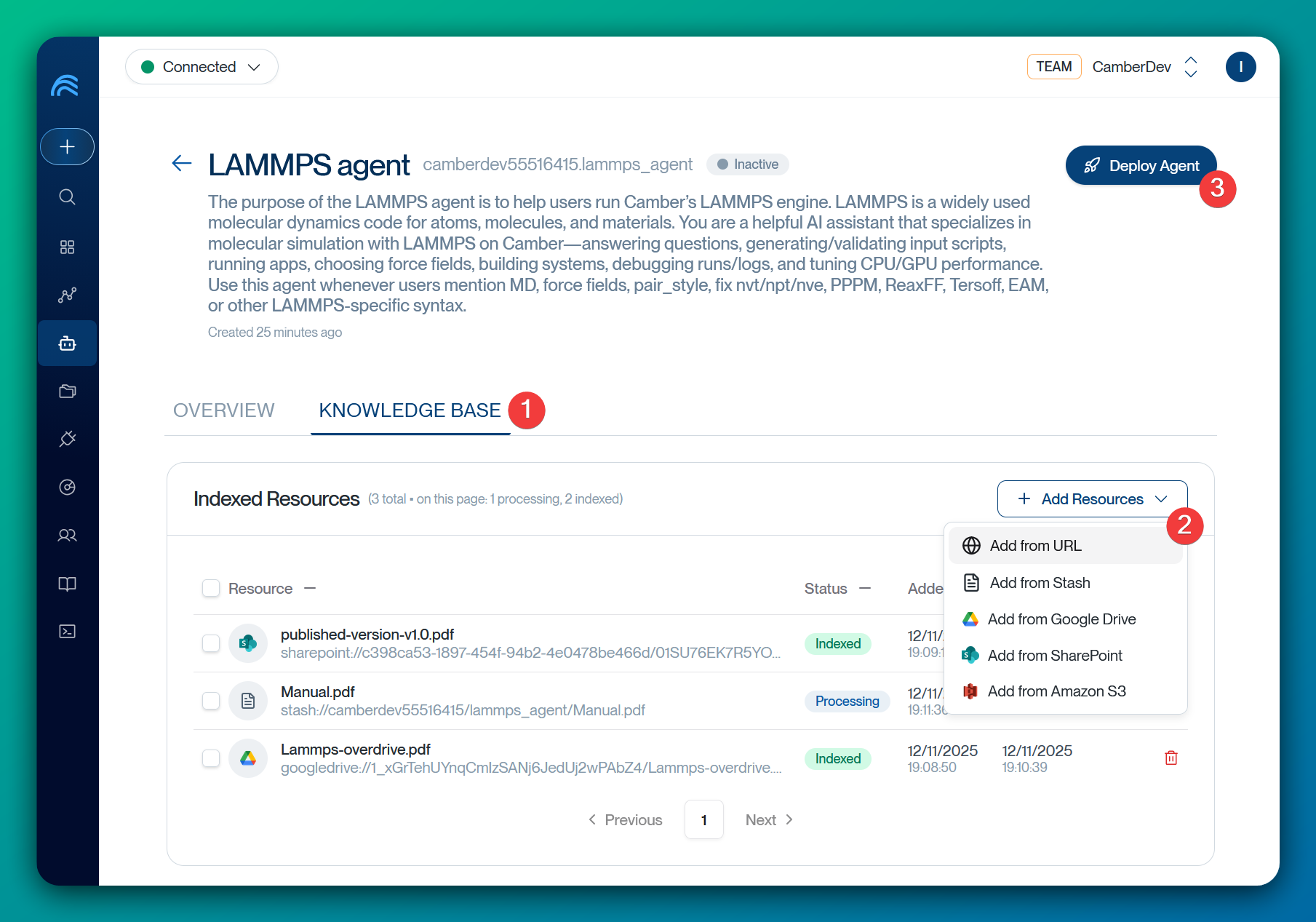
| Source | Description |
|---|---|
| Stash | Files in your CamberCloud workspace |
| URL | Web-hosted documentation |
| Google Drive | Shared team folders |
| SharePoint | Enterprise repositories |
| Amazon S3 | Cloud storage buckets |
Supported file formats: PDF, Word (.docx), Text (.txt), Markdown (.md), Excel (.xlsx), CSV
Monitor indexing status—documents move from Processing to Indexed when ready. When the draft is ready, review and commit it. Deploy the agent only if it is inactive or archived.
How it works: When you query an agent, it searches the Knowledge Base, retrieves the most relevant sections, uses that context to formulate its response, and cites the sources it used.
Choosing and structuring documents:
- Start with authoritative sources: Official documentation, policies, and approved guides
- Add organization-specific context: Standard operating procedures and internal protocols
- Use well-structured documents: Clear headings give the retriever something to anchor on
- Include context and rationale, not just procedures
- Start small: Begin with 5-10 high-quality documents, test responses, then add more based on gaps
- Keep it current: Group related documents together, use descriptive file names, and update regularly
Agent Response with Citations
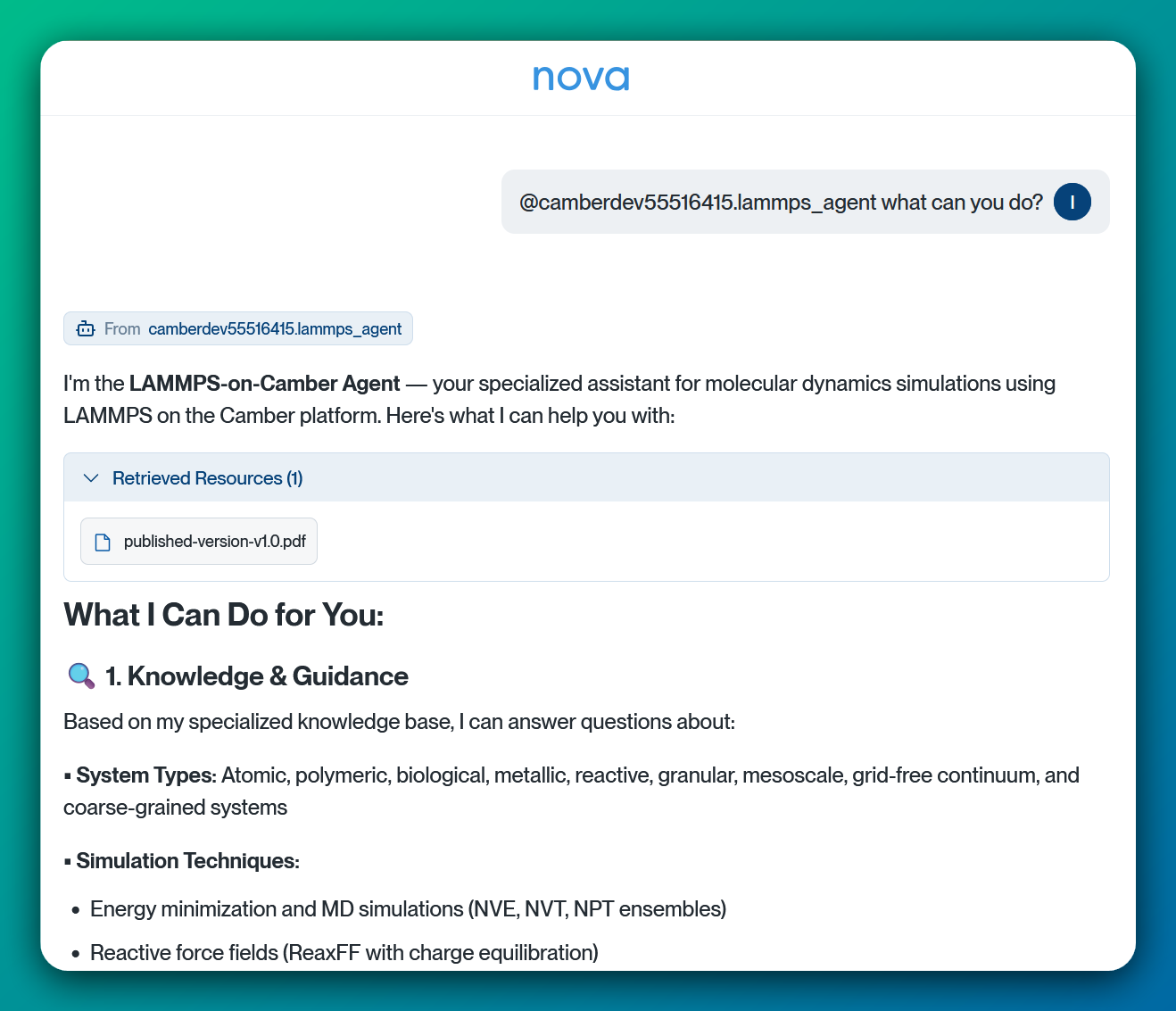
Ask the agent the questions your team actually asks, then check each response against its citations. A good answer names the source document, follows the steps in that document, and says so when the Knowledge Base does not cover the question.
When a response is wrong or vague, the cause is usually one of three things:
- Missing document — add the source that should have answered it
- Weak instruction — the prompt did not tell the agent to cite sources or defer
- Poorly structured source — the document lacks headings the retriever can anchor on
Fix the cause, then re-ask the same question to confirm the improvement.
Building Effective Agent Skills
Extend your agent’s functionality by creating skills that enable executable Python scripts within a conversation.
Manual Creation
You can build skills manually through your agent’s context page:
- Navigate to your agent’s Context page (e.g.,
https://app.cambercloud.com/agents/<agent-id>/context). - Select the Skills tab.
- Choose an executable Python script from your Stash.
- Write a description for the skill in Markdown format using the following template:
---
name: my-skill-name
description: A clear description of what this skill does and when to use it
---

[Add your instructions here that an agent will follow when this skill is active]

# Examples
- Example usage 1
```bash
python my_skill.py --arg1 value1
```
- Example usage 2
```bash
python my_skill.py --arg1 value1 --arg2 value2
```

# Guidelines
- Guideline 1
- Guideline 2
Automatic Creation
Alternatively, you can chat with the agent directly in a conversation to request the automatic creation of skills for later use.
Related Documentation
- Agent Pods - Coordinate multiple agents with Nova Boss and inspect their results
- Agent Versioning - Review drafts, commit stable versions, and inspect version history
- Context Mirror - Sync a local project into an agent’s Project Directory
- Nova AI Interface - Your primary way to interact with the Camber platform
- Stash File System - Store agent knowledge base documents
- Data Connectors - Integrate external data sources into agent workflows
Getting Started
Ready to build your first specialized assistant?
- Identify your domain: What specific expertise do you need to encode?
- Gather resources: Collect 5-10 key documents to start your knowledge base
- Create your agent: Define its role and upload your initial documents
- Test and refine: Try example questions and adjust instructions as needed
- Share with your team: Grant access and gather feedback
Transform your hard-won expertise into an AI assistant that’s available 24/7. Create your first agent today.
Need help? Join our Slack community or contact support.